If you’re running an ecommerce business the odds are good that you’ve encountered the Popular Products element in Google search. While it might be easy to mistake this SERP element as part of Google’s paid search advertising inventory, it’s actually an extension of the Google Shopping experience into traditional organic search results. Additionally, it represents Google AI capabilities’ appearance on shopping-relevant searches on top of their well-established presence on informational SERPs via AI Overviews.
Brief History of Popular Products SERP Feature
The path to today’s Popular Products grid began around 2019–2020. Before this, Google’s organic search results for products were primarily text-based, occasionally supplemented by "Rich Snippets" (those gold stars and price tags you see under a link).
The Shift to Organic Listings
During the pandemic, Google made a big move by opening up Google Shopping listings to organic listings. Previously, appearing in the Shopping tab required buying into its ad marketplace. By opening the ecosystem to free listings, Google laid the groundwork for the Popular Products SERP element.
The Rise of the Grid
Google began experimenting with "Popular Products" as a dedicated module for high-volume apparel and home goods queries. By 2022, this expanded into almost every retail category.
2024–2026 Evolution
Today, the element has evolved into a highly interactive experience. It includes real-time pricing, multi-retailer comparisons, and product descriptions that synthesize reviews to tell shoppers why a product is popular before they even click a link.
Why Popular Products Matter
Increased shelf space in search results
According to a 2026 study by seoClarity, the Popular Products element has seen a significant rise in prevalence, growing approximately 36% year-over-year between 2024 and 2026. This signals a fundamental shift in how Google prioritizes product discovery. By effectively surfacing Google Shopping on the traditional SERP this way implies a shift from traditional text-based results toward a more immersive, retail-centric interface that captures consumer attention earlier in the buying journey.
Because of its prominent placement close to the top of the SERP, Popular Products now represents the most high-value real estate on the results page. SeoClarity research highlights that appearances in Positions 1-3 – the top of the SERP – surged by roughly 72% over the last two years. So it’s clear there’s a big opportunity for extra ecommerce visibility. At the same time, vendors who don’t appear in Popular Products risk being pushed out of prominence and traffic potential, even if they feature prominently in traditional rankings for the exact same search terms.
Impact on click-through rates across industries
Since it can appear on any search that has a potential shopping search intent, Popular Products has broad relevance for many kinds of businesses. The same seoClarity study found strong concentrations across relevant keywords in several industries:
- Business & Industrial - 15%
- Home & Garden - 14%
- Apparel - 11%
- Leisure - 10%
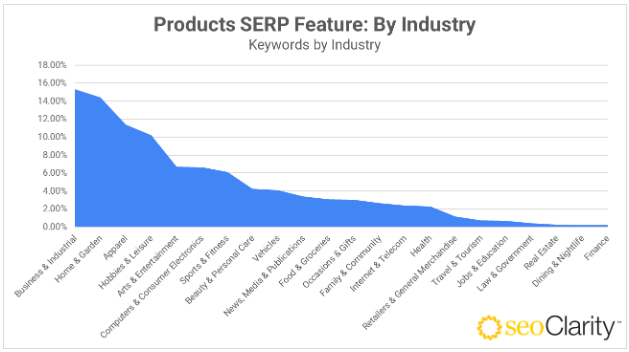
Additionally, the SERP element has seen a significant increase in overall prevalence between 2024 and 2026, growing approximately 36% year on year.
Popular Products and the AI Angle
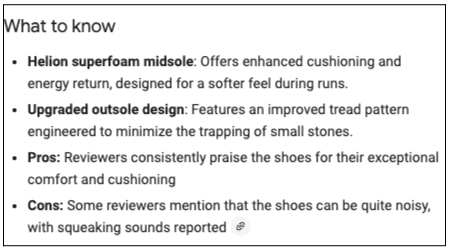
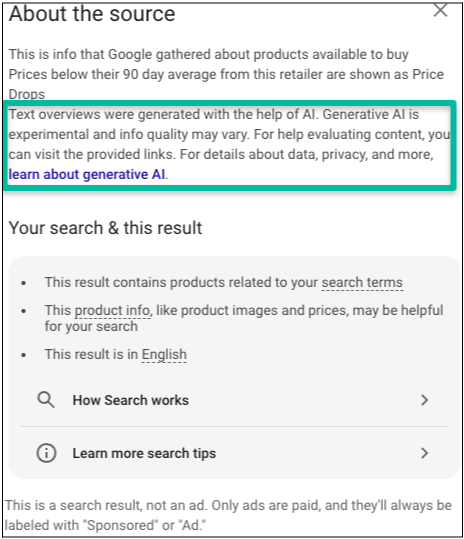
The Popular Products SERP element features descriptive copy that’s stated to come from generative AI.
Elements of Popular Products
Popular Products features broadly replicate the features and format of the Google Shopping tab, bringing that search type’s functionality directly into the traditional SERP.
Here are the core aspects, using a group of typical listings on a desktop browser as the example:
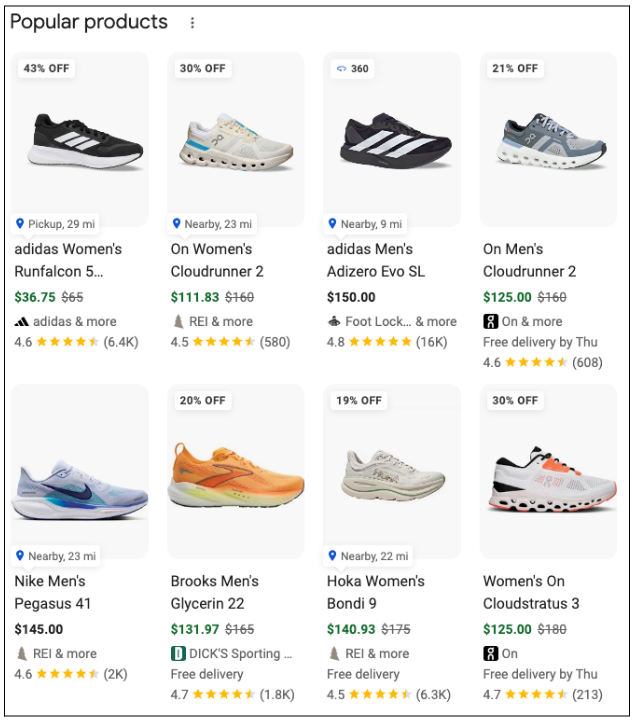
1. Main Grid / Carousel
- Product Thumbnail: An image of the product, usually on a plain white background.
- Product Title: The descriptive name of the item (often optimized as Brand + Product + Key Feature).
- Price & Deals: The current selling price. It may include a strikethrough price if the item is on sale, or a "Price Drop" badge if Google detects a recent reduction.
- Star Ratings & Review Count: Aggregate ratings (e.g., 4.5 stars) and the total number of reviews, pulled from various retailers or third-party review sites.
- Brand Name: The manufacturer or brand of the product.
Merchant Metadata: Small labels like "In Stock" or shipping info such as "Free Shipping" or "Fast Delivery."
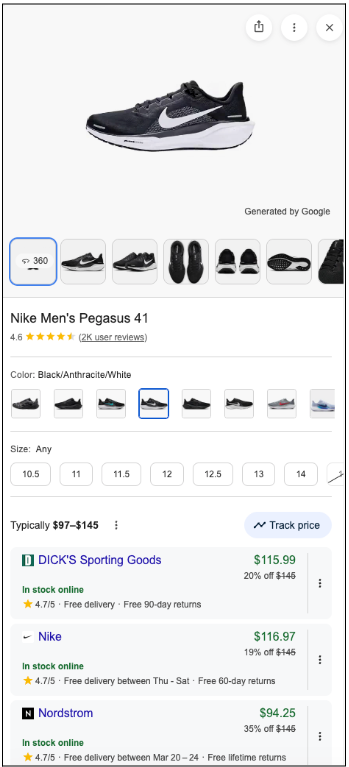
2. Product View (Side Panel)
When you click a product in the grid, a side panel (on desktop) or a full-screen overlay (on mobile) opens, containing:
- Image Gallery: Multiple angles of the product and sometimes user-submitted photos.
- Retailer List: A list of different stores selling the item, including their individual prices and a "Visit Site" button for each.
- Product Description: A detailed text summary of the product features.
- Detailed Reviews: A breakdown of specific customer reviews, often including "Pros" and "Cons" snippets.
- Attribute Details: Specific specs such as color, material, size, and gender.
Important details about Popular Products and how to optimize
Here are a couple of key things to keep in mind when aligning your brand’s products to be more competitive in Popular Product listings.
Google Merchant Center connectivity is essential
The number one thing your ecommerce operation should be doing right now vis-á-vis Popular Products is make sure that your website’s product feeds are properly uploaded to a Google Merchant Center account. Merchant Center listings are where Popular Products derives many of the details it displays.
Make sure that those responsible for inbound organic traffic have access to your Merchant Center account as well, and that they’re collaborating with digital marketing and product teams.
Popular Products features PDPs not PLPs
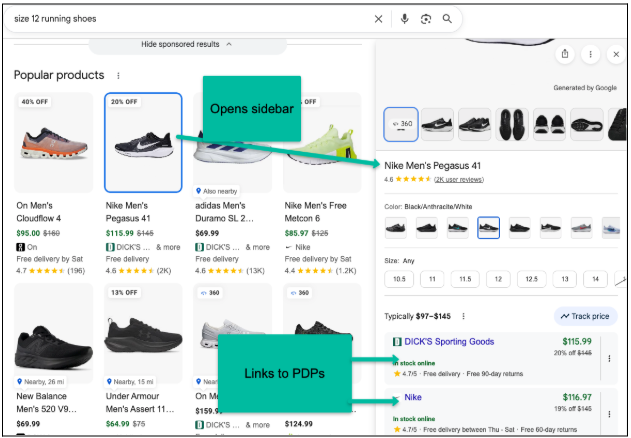
If you already drive significant traffic to your products via organic search you may have noticed that Google often ranks Product Listing Pages (PLPs) most prominently for high-intent shopping searches like size 12 running shoes. As we saw in the example image above, though, Popular Products features individual products relevant to your search, not collections of products.
Popular Products listings are SERPs within the SERP
At first glance the main grid might look like it would link the user directly to a vendor’s product page upon clicking on one of the eight product listings. In actuality a click on the main grid brings up the product view side bar, which includes the retailer list.
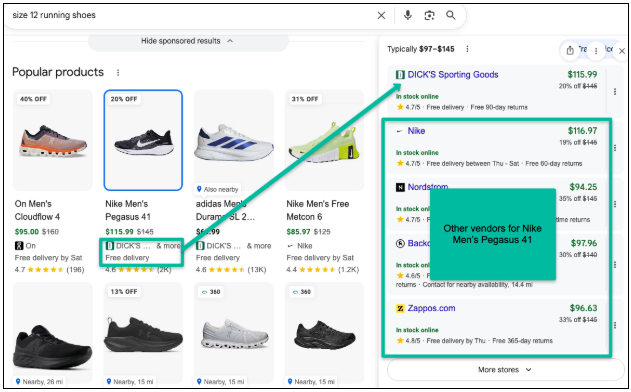
In the example below we see that DICK’S Sporting Goods, the vendor that appears for Nike Men’s Pegasus 41 in the main grid, is at the top of the retailer list, but there are several other vendors right below it. This SERP within a SERP element opens up the ability for your brand or your competitors to continue to attract customers for a product even if you aren’t necessarily the “Position 1” for that product in the main grid.
Popular Products emphasizes pricing and customer reviews
Within the retailer list it appears that “rankings” vary based on a variety of factors, two of the most important ones being price and average review scores.
Since product info is pulled from Merchant Center data, pricing here can update quite quickly and factor in decreases tied to ongoing promotions or limited-time sales. While it’s not guaranteed that the vendor with the lowest price for a product will always get top billing (see example above) it is a factor. Alongside continuing to promote frequent positive product reviews, strategic deployment of price reductions, especially during key seasonal peaks for consumer spending in your industry, can contribute to peak visibility at the right times.
Because of the emphasis on competitive pricing, it’s not yet clear how applicable Popular Products is for brands focused on upscale or luxury retail, where discounting is not as central a part of product strategy and may actually be a detriment to brand reputation.
How to optimize for Popular Products: Action items
- Upload site product feeds to Google Merchant Center
- Provide SEO expert(s) with access to Merchant Center
- At the minimum, ensure the following attributes are defined for everything in your product catalog:
- ID
- Title
- Description
- Link
- Image_link
- Price
- Brand
- Gtin
- Availability
- Ensure on-page information on PDP is as consistent with Merchant Center data as possible. See all fields above for reference on what to check up on
- Review product images – Make sure they’re abundant, high resolution (as high quality as competitors’ at the bare minimum) and speak to the product aspects most customers really care about
- Keep abreast of competitor pricing strategies and plan accordingly, especially around prime consumer spending periods
- Encourage customer reviews with on-page calls to action as well as email campaigns
If you want to save time and resources, though, get in touch with BMG360 and find out how we can partner to scale your ecommerce SEO efforts and free you up to focus on other parts of your business.
